
Passport Size Photo on A4 Sheet: Capacity & Layout
Arranging multiple passport size photos onto an A4 sheet is the most economical way to print copies at home or at a local cyber cafe. Learn how grid layouts work and how to export a 1:1 scale PDF via Passport Photo Maker by Photocopywale.com.
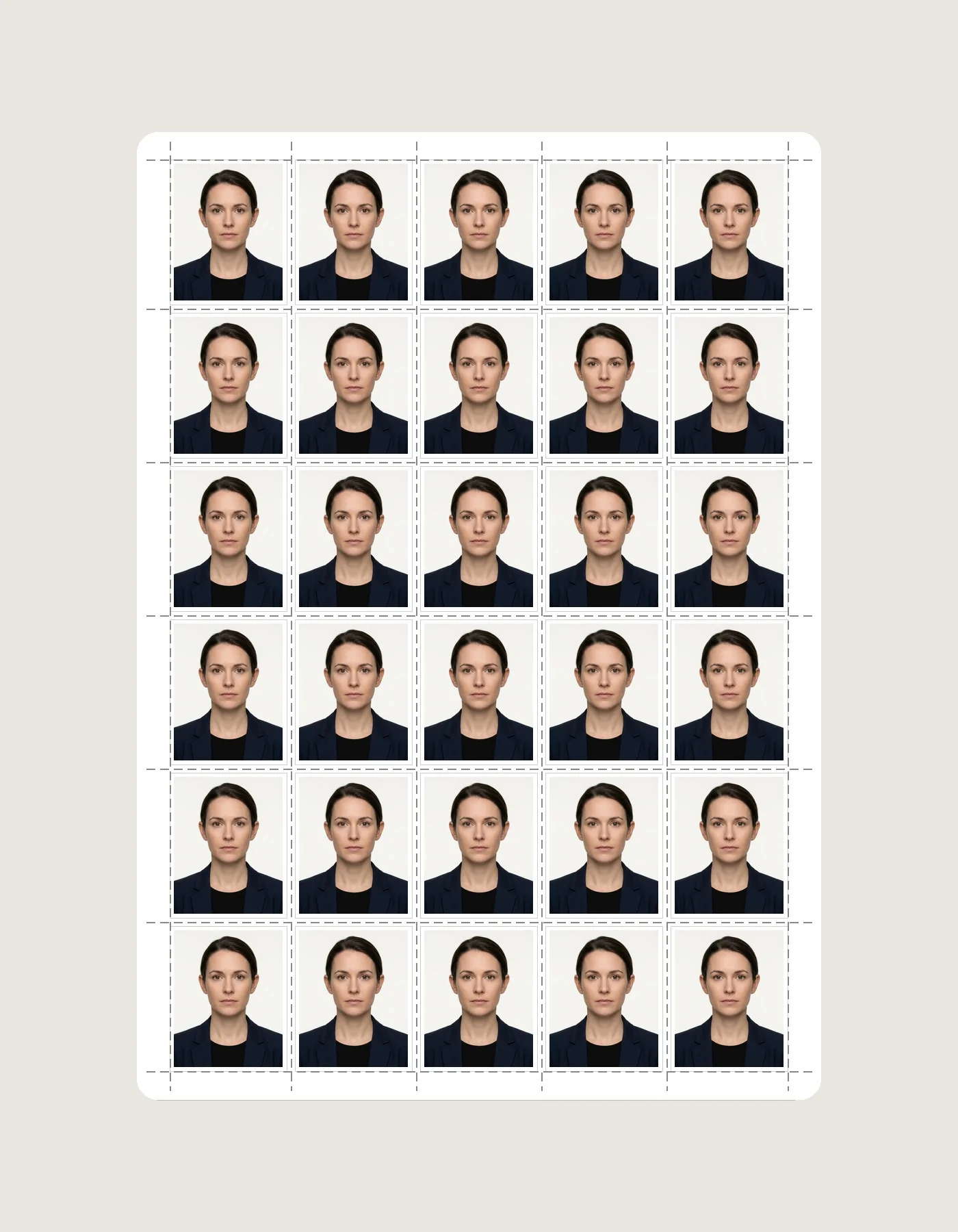
A4 Grid Layout (30 Photos: 5 Columns × 6 Rows)
What Is a Passport Photo A4 Sheet?
An A4 photo sheet is a standard international sheet (210 × 297 mm / 8.27 × 11.69 inches) that contains multiple copies of your passport size photo tiled in a clean, equidistant grid.
An A4 sheet can place many copies on one page, which is useful when you need repeated passport-style prints. Actual printing cost depends on paper, ink, printer, local shop pricing and the selected layout, so compare the sheet preview with the option available to you.
How Many Passport Photos Fit on an A4 Sheet?
The total number of photos depends on the selected photo dimensions, outer printable margins, and spacing between photos:
5 cols × 6 rows with generous 4mm margins
6 cols × 6 rows for maximum paper efficiency
2 cols × 4 rows on standard 102×152mm cards
How to Create a Passport Photo A4 Sheet Online
Upload & Crop Your Photo
Select your portrait and align it with the 70%–80% biometric face guides.
Choose A4 Sheet Template
Select "A4 Sheet (30 Photos)" in the Sheet Size tab of the editor.
Download 1:1 Vector PDF
Click "Download A4 Sheet (PDF)" to get a print-ready vector PDF document.
Print at 100% Actual Size
Load photo media supported by your printer and suitable for the receiving application. If the exported sheet is already at the intended scale, avoid automatic Fit-to-Page resizing and measure one test print.
Once Your Photo Is Ready, Arrange Multiple Copies
Once your photo is ready, you can arrange multiple copies using our free passport photo maker. The editor automatically adds scissor cutting lines between photos so each photo cuts out to exact 35×45 mm size.
Frequently Asked Questions About A4 Photo Sheets (10 Answers)
1. How many passport photos fit on one A4 sheet?
Standard 35×45 mm passport photos fit 30 copies (5×6 grid) or up to 36 copies (6×6 grid) with margins and scissor cutting guidelines.
2. What are the exact physical dimensions of an A4 sheet?
An A4 sheet measures exactly 210 × 297 mm (21.0 × 29.7 cm / 8.27 × 11.69 inches).
3. Why does the Passport Photo Maker by Photocopywale.com add scissor lines?
Photocopywale.com automatically embeds ultra-fine 0.5pt scissor hairlines between tiled photos so that cutting them manually produces clean, exact 35×45 mm borders.
4. Can I print passport photos on normal 70 GSM A4 photocopy paper?
Plain copy paper is usually not ideal for photo-quality output. Use photo media that your printer supports, and follow any paper or finish requirement stated in the application instructions.
5. How much money do I save by printing an A4 photo sheet?
The cost of an A4 passport-photo sheet depends on paper, ink, printer, location and service fees. A multi-photo layout can improve sheet utilization, but actual savings should be calculated from your own print cost.
6. How many passport size photos fit on a 4×6 inch photo card?
On a standard 4×6 inch (102×152 mm) photo card, 8 passport photos fit comfortably in a 2 column × 4 row grid.
7. Can I combine photos of different family members on one A4 sheet?
Yes. Use the Multi-Photo Tray on Photocopywale.com to upload different portraits; all photos tile onto the same printable A4 sheet.
8. What printer setting ensures A4 sheets print at 100% actual size?
If the exported sheet is already prepared at the intended physical size, start with 100% / Actual Size and disable automatic Fit-to-Page resizing. Measure a test print before producing multiple copies.
9. How do I download an A4 printable sheet from Photocopywale.com?
Upload your photo, select "A4 Sheet (30 Photos)" in the Sheet Size tab of the editor, and click "Download A4 Sheet (PDF)".
10. Can I print an A4 passport photo sheet at any local cyber cafe?
Yes. Take the downloaded PDF to any local print shop or cyber cafe and ask for a color print on glossy photo paper at 100% scale.