
Passport Photo Background: What You Need to Know
A passport-photo background should be prepared to the current instructions for the application you are using. Learn how color, shadows, lighting, and edge cleanup affect the finished image without assuming one universal background rule.
Clean Plain Background vs. Distracting Background
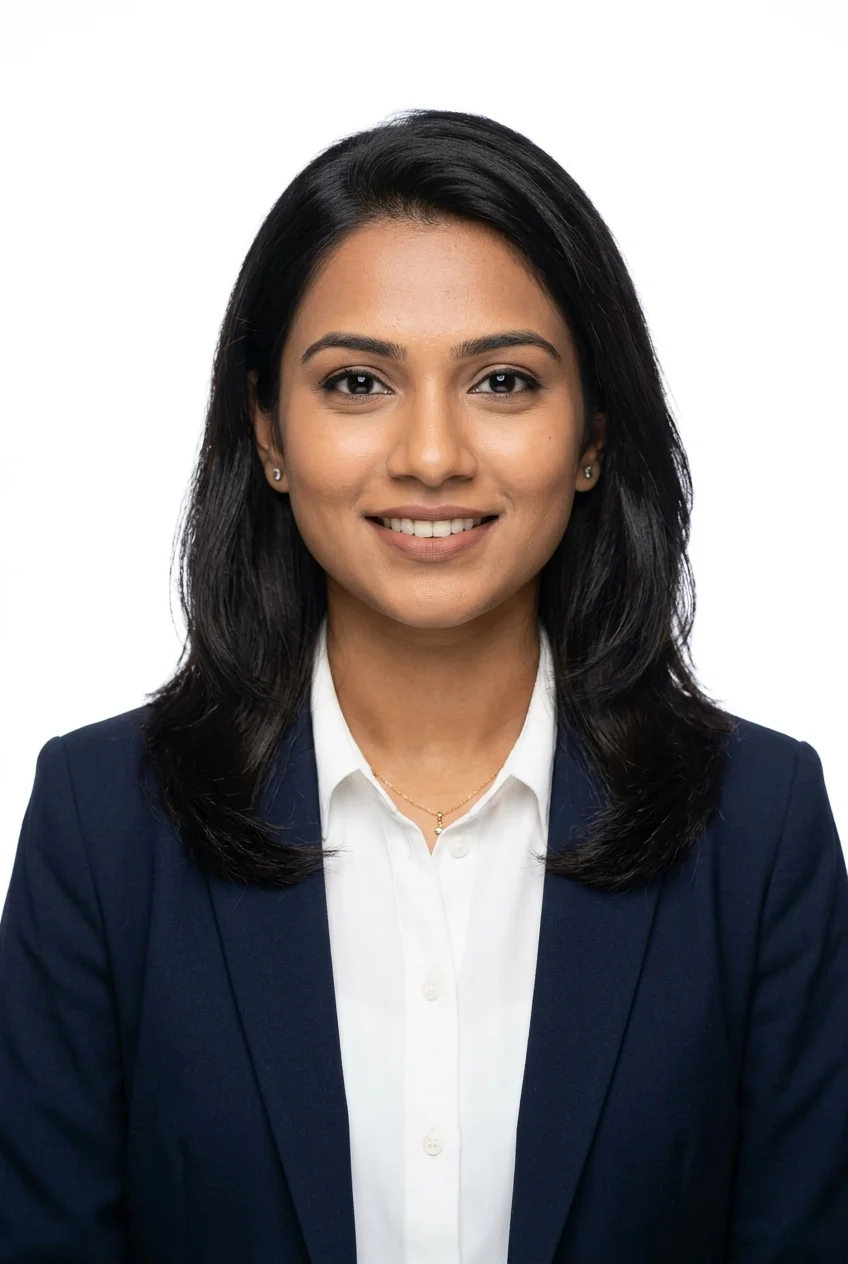
- • Pure, flat solid white background
- • Zero silhouette shadows behind ears
- • High contrast with dark clothing
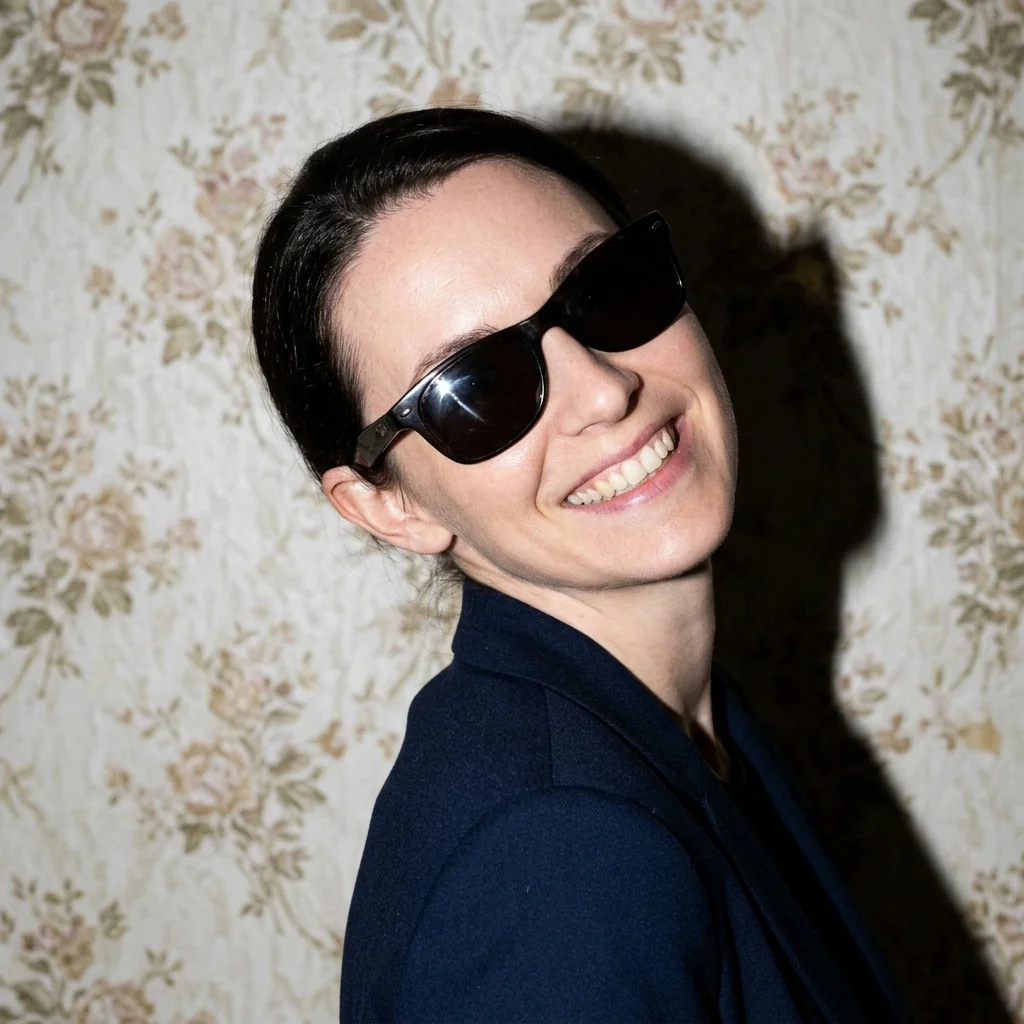
- • Flash shadow cast behind head
- • Textured room wall or wallpaper
- • Off-white or yellowish room lighting
Why Does the Passport Photo Background Matter?
Backgrounds matter because they affect how clearly the head, hair, ears, neck, shoulders, and clothing edges can be seen. Patterns, furniture, color casts, or strong shadows can distract from the portrait and may conflict with application-specific instructions.
What Should a Passport Photo Background Look Like?
When preparing a background, separate general image-quality guidance from the exact rule for your application. A clean result usually has:
Background and Lighting: Why a White Wall Alone Isn't Enough
Simply standing in front of a white domestic wall is rarely sufficient if your room lighting is uneven. Direct overhead light bulbs cast harsh nose shadows, and using a camera flash too close creates a dark silhouette halo behind your head.
Step 2 to 3 feet away from the wall and stand facing a large window with soft natural daylight. This lights both sides of your face evenly while pushing any soft shadows down away from the background.
Can You Change the Background of a Passport Photo?
Yes. PhotocopyWale's photo maker can isolate the portrait and apply a selected background color. Use white only when it matches the application, and use the manual touch-up brush to correct halos or stray edge pixels around fine hair and shoulders.
Background requirements are application-specific
PhotocopyWale can help prepare a clean background, but it does not decide which color an authority accepts. Check the latest official instructions for the passport, visa, or application you are preparing.
How we verify passport-photo informationFrequently Asked Questions About Passport Backgrounds (10 Answers)
1. Does every passport photo require a pure white background?
No. Background requirements vary by authority and process. Many passport-style workflows use a plain light or white background, but the exact required color should come from the current official instructions.
2. Are light blue or grey backgrounds accepted for Indian passports?
Do not assume a color is accepted or rejected universally. Follow the background color stated by the receiving authority for the specific application.
3. Why do flash shadows behind the ears cause passport photo rejection?
Heavy silhouette shadows reduce separation between the subject and background and can make the portrait harder to evaluate. Even lighting usually gives cleaner edges.
4. Can I wear white clothes in a passport photo with a white background?
It is strongly discouraged. White clothing blends into the white background, creating a "floating head" appearance. Wear dark or contrasting colors.
5. How do I take a shadow-free photo at home using natural window light?
Stand 2 to 3 feet in front of a plain wall and directly face a window with soft natural daylight.
6. Can I change my photo background to white on Photocopywale.com?
Yes. The Passport Photo Maker includes background-removal and color controls. Choose the background requested by your application and inspect the result before export.
7. How does the in-browser background remover on Photocopy Wale work?
The core editing workflow is designed to process the image in the browser. Browser storage can retain drafts or settings, and optional connected features may use different data flows; see the privacy policy for details.
8. What should I do if some background remains around fine hair strands?
Use the built-in manual touch-up eraser in the editor to clean up any unwanted pixels around your hair.
9. Can I use a textured wall as a passport photo background?
Textured plaster, wallpaper, or brick can be distracting. If your application asks for a plain background, use a smooth surface or remove the pattern carefully without altering facial features.
10. Can I use an edited background for a passport-photo application?
Whether an edited background is acceptable depends on the application. If editing is allowed, keep facial features natural, use the required background, and inspect the edges for visible cut-out artifacts.